


PRO Landscape Contractor
1.825.00 Reviews
App Specs
- Version
- 3.0
- Updated On
- License
- Free
- Downloads
- 10,000+
- Developer
- Drafix Software, Inc.
- Categories
- Business
- Platform
- Android
Screenshots
 Analysis by AppCompare
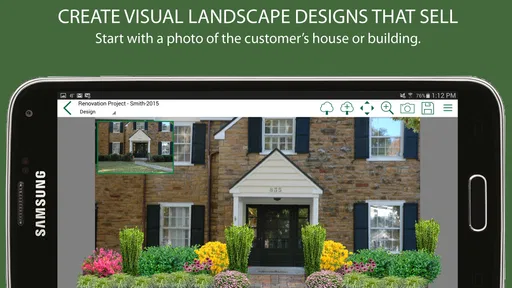
I approached PRO Landscape Contractor as a practical business tool rather than a casual design app, and that distinction matters. Its purpose is to help landscape professionals turn a customer’s outdoor space into a visual proposal and use that proposal during the selling process. In my experience, that is a much more useful idea than simply showing a customer a gallery of attractive gardens: the conversation starts with their own property, their own driveway, patio, lawn, or planting area.
The app comes from Drafix Software, Inc. and sits in the business category. It is free to install, with optional in-app purchases ranging from under a dollar to several dozen dollars per item. The audience is clearly professional, even though the content rating is Everyone. I would not choose it because I want a hobby garden planner; I would choose it because I need a faster way to explain a proposed landscape job and make the estimate feel concrete.
Where the visual selling approach works best
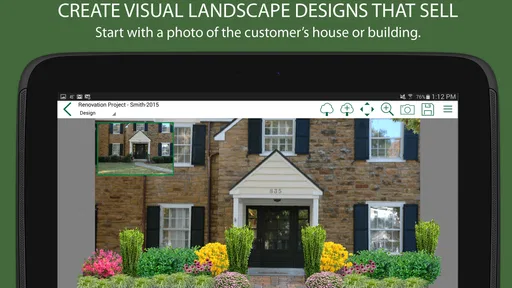
The strongest part of the experience is the shift from verbal description to visual discussion. A customer may understand “a low-maintenance planting bed along the entrance,” but that phrase can mean something different to every person in the room. A visual proposal gives both sides something specific to inspect. I can point to the area, discuss the balance of hardscape and planting, and adjust the conversation before the crew ever arrives.
That makes the app especially useful during an initial site visit. Instead of taking photographs and promising to prepare something later, a contractor can use the customer’s property as the basis for a design conversation. Even when the finished plan still needs refinement, the customer can react to an idea immediately. That shortens the distance between “what if we changed this area?” and “yes, that is the direction I want.”
I also found the visual angle valuable for customers who struggle to read conventional plans. A flat drawing can be accurate and still fail to communicate how a project will feel from the front walk or from a window. A photo-based presentation is easier to discuss with a homeowner who does not know landscape terminology. It can also expose disagreements early: a customer may like the proposed planting but dislike how much of the lawn disappears, or prefer a different balance around the entrance.
That is the real selling strength here. The app is not merely trying to make a proposal look polished. It helps make the proposal understandable. For a contractor who regularly loses time explaining the same concept in different ways, that can be more important than having an enormous catalog of decorative options.
A useful workflow for a real customer visit
A sensible workflow is to begin with the customer’s priorities rather than with plants or visual effects. I would first clarify whether the job is mainly about curb appeal, privacy, entertaining, easier maintenance, drainage, or replacing an awkward existing area. Then I would use the visual design process to test those priorities against the property. This prevents the presentation from becoming a collection of attractive elements that do not solve the customer’s actual problem.
Worth Reading Before You Choose

Flipboard Shows What News Apps Must Do Beyond the Feed

Switching to Android Auto Means Rethinking Your Driving Routine

Google Calendar Makes a Crowded Week Easier to Manage

Ludo King Makes the Most of the Minutes Between Plans

Baby Panda World Brings Quick Play to Modern Phones, but Its Game Library Feels Busy

ESPN’s Live Game View Makes Following Close Games Easier
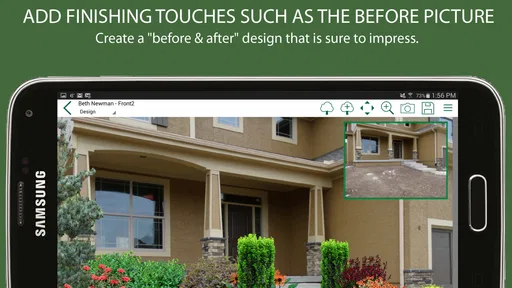
For example, imagine visiting a homeowner who wants a more welcoming front entrance but does not want to increase weekly maintenance. I would use the existing view as the starting point, discuss the walkway and planting zones, and keep asking whether each proposed change supports the maintenance goal. The visual result becomes a decision tool: it helps the homeowner compare a restrained entrance treatment with a fuller planting scheme instead of choosing based on an abstract description.
A second useful tactic is to prepare more than one direction, but keep the differences meaningful. One version might emphasize a simpler layout and easier upkeep, while another might give more attention to screening or seasonal interest. The point is not to overwhelm the customer with endless variations. It is to frame the trade-off clearly. A good visual proposal should answer, “What changes if we spend more, plant more, or simplify the design?”
I would also use the app before the appointment to organize the story of the job. Start with the current problem, show the proposed change, then connect that change to the customer’s stated priorities. This is more persuasive than opening with a finished-looking image and immediately discussing cost. The design should explain the work, not distract from it.
Why this can improve bidding conversations
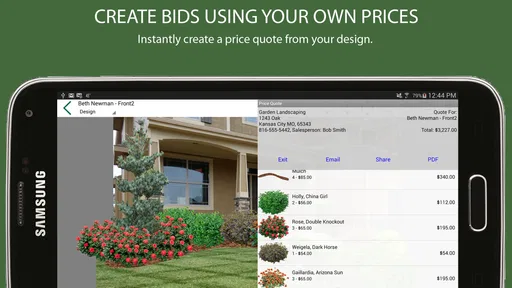
Landscape estimates often become difficult when the customer sees a number without fully understanding what it represents. A visual proposal gives the price a physical context. It lets the contractor tie labor and materials to visible areas: the new border, the revised planting bed, the seating zone, or the entrance treatment. That does not guarantee a sale, but it makes the bid easier to evaluate.
There is also a useful psychological difference between asking a customer to imagine a change and asking them to respond to a visible version of it. The latter produces better questions. Instead of “How much would landscaping cost?” the discussion can become “Could we keep this section of lawn?” or “What would we remove to stay within budget?” Those are more productive questions because they move the project toward a defined scope.
My advice is to treat the visual plan as a conversation aid, not as a substitute for a proper estimate. The app can help communicate the intended result, but a contractor still needs to explain materials, preparation, installation, maintenance, site conditions, and any changes that could affect the final cost. A beautiful design image can create the wrong expectation if it is presented as a complete promise rather than as a design proposal.
Practical strengths, limitations, and trade-offs
The app’s focus gives it an advantage over generic presentation software. A normal slideshow or photo editor can display images, but it does not naturally support a landscape sales workflow. With a general-purpose alternative, I would have to assemble photographs, annotations, sample images, and pricing explanations separately. That can work for an experienced salesperson, but it creates more preparation and makes the process feel disconnected.
Compared with a paper sketch, the visual approach is easier for many homeowners to understand. Paper remains quick and flexible, especially when a customer wants to scribble changes or when the site visit is informal. However, a sketch can require stronger drawing skills and may not communicate scale or atmosphere as effectively. I would use paper for rough notes and the app for the presentation that needs to carry the idea forward.
Compared with a full computer-based landscape design package, the appeal is convenience. A desktop system may offer deeper control for detailed plans, technical documentation, or large projects, but it usually demands more time, a larger screen, and more preparation. This app makes more sense when the immediate goal is to sell and explain a job rather than produce every technical document needed for construction.
That trade-off is important. I would not expect a visual bidding app to replace professional drafting, site measurement, or project management software. If a project needs precise grading information, complex construction details, irrigation documentation, or a formal set of plans, a specialist desktop workflow may be the better choice. The app is strongest earlier in the process, when the contractor and customer are deciding what the project should be.
The friction I would want contractors to anticipate
The low average rating of 1.8 from around 58 ratings is a meaningful warning sign. I would not ignore that simply because the concept is useful. A strong idea can still be frustrating if the interface feels dated, if the workflow takes too many steps, or if the available content does not match the way a particular contractor sells landscape work. The app has more than 10 thousand installs, so it is not an unknown experiment, but its reception suggests that prospective users should test it carefully before making it central to their business.
The release history also tells me to set realistic expectations. The app was released in March 2015 and is currently at version 3.0. That does not automatically make it unsuitable, but it does make compatibility and workflow testing important. On Android, the minimum operating system is 6.0. I would install it on the actual phone or tablet used in the field, not just on an office device, and I would run through a complete sample proposal before using it with a paying customer.
Another point of friction is the purchase model. The app is free to start, but optional items cost from $0.99 to $39.99 each. For a contractor, that means the real value depends on what is included at no cost and which additional materials are useful for the company’s typical jobs. I would avoid buying a large collection immediately. First, I would create a representative project, identify the missing elements, and purchase only what supports the type of work I actually sell.
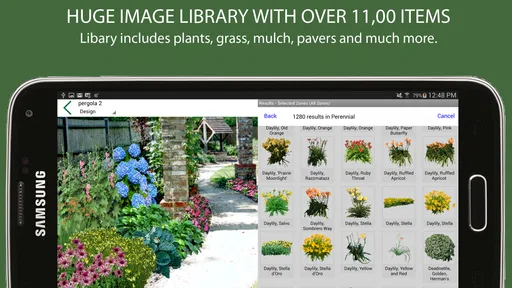
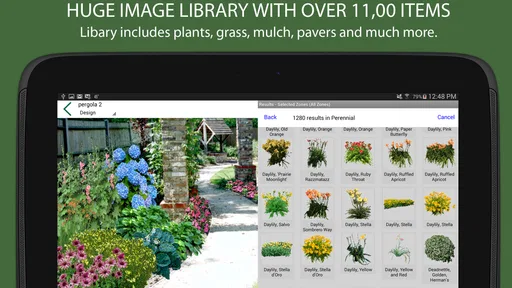
This is one of the less obvious decisions surrounding the app: a larger library is not automatically a better sales tool. Too many choices can slow down a site visit and tempt a contractor to design around available images rather than around the property. A smaller, familiar set of options may produce clearer proposals. I would build a repeatable visual vocabulary for common services and use additional purchases only when they solve a real presentation gap.
Three ways to get more value from the tool
First, use it to expose scope changes before they become disputes. When a customer asks for “something more,” I would show exactly which visible area changes and explain what that means for the bid. This creates a shared reference point. It is much safer than agreeing casually and trying to reconstruct the request later from memory.
Second, use the visual plan to separate must-haves from optional improvements. A base proposal can show the essential access or planting work, while a second direction can show an upgrade such as additional screening or a more developed entrance. This gives the customer a choice without making the original bid feel incomplete. It also helps a contractor protect the margin by making additions explicit rather than quietly absorbing them.
Third, keep the presentation grounded in the customer’s daily routine. If the homeowner parks in a certain place, walks a dog through a particular gate, or wants to see the front door from the street, those practical details should guide the visual discussion. The most persuasive design is not necessarily the most elaborate one. It is the one that makes the customer recognize how the proposed landscape fits real life.
A fourth tip is to save time by reusing a consistent presentation sequence. Begin with the existing condition, move to the main design idea, identify the functional improvement, and then discuss alternatives. Consistency makes it easier to compare jobs and train another salesperson. It also prevents the app from becoming a collection of disconnected images that look impressive but do not support a clear bid.
Who should use it, and who should skip it
I think PRO Landscape Contractor is best suited to small and midsize landscape businesses, independent contractors, and salespeople who meet customers on site. It is particularly appealing if your work depends on helping homeowners visualize planting, outdoor living, entrance improvements, or general property makeovers before they commit. The free entry point makes experimentation easier, although the optional purchases should be treated as part of the evaluation rather than an afterthought.
It can also suit a contractor who already has strong field knowledge but feels less confident presenting design ideas. The app does not need to turn that person into a landscape architect. Its value is in giving the conversation a visual structure. Someone who knows what will work on a property can use that structure to explain the recommendation more clearly.
I would be cautious if your business sells highly technical projects where visual appearance is only one small part of the decision. Large grading operations, detailed irrigation plans, engineered retaining structures, or projects requiring formal construction documentation may need tools built for technical accuracy and project coordination. In those cases, this app may still help during the sales conversation, but it should not be the only digital system involved.
I would also skip it if you are a homeowner looking for a simple personal garden planner. The business-oriented workflow is more relevant to people preparing proposals and bids. A consumer gardening app may be easier if your goal is choosing plants, tracking maintenance, or experimenting with a backyard layout without a sales process around it.
Device, cost, and preparation questions worth answering first
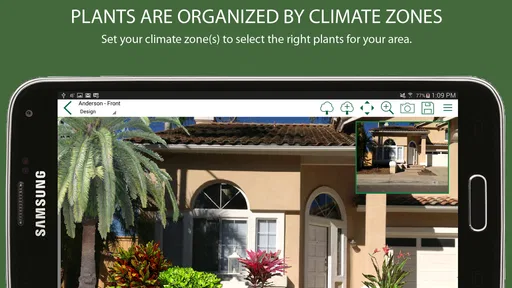
Before relying on it in the field, I would check three things. First, does the device meet the Android requirement of version 6.0 or later? Second, does the screen provide enough room for a customer to comfortably review the design? Third, does the free version support a realistic sample job, or would the required optional items make the workflow too limited? These checks are more useful than judging the app from its store summary alone.
I would also prepare a fallback for a site visit. A contractor should not depend on one presentation method when a customer is ready to make a decision. Keep the site photographs, measurements, notes, and estimate organized separately so the conversation can continue even if the app is not ideal for a particular property. That is not a criticism unique to this product; it is simply good field practice when a digital tool sits inside a larger selling process.
Because the app is rated for Everyone, age restrictions are not a concern for ordinary use. The more relevant concern is professional fit. A tool can be accessible to anyone and still require a contractor’s judgment to produce a responsible recommendation. I would never let the visual result imply that a plant, structure, or layout is automatically suitable without checking the site, local conditions, maintenance expectations, and construction requirements.
My final view on PRO Landscape Contractor
My overall view is favorable toward the concept but cautious about the execution. The app addresses a real problem: landscape work is difficult to sell when customers cannot picture the result. By putting the proposed change into a visual conversation, it can help contractors explain ideas, compare priorities, and make a bid feel connected to the property rather than detached from it.
Its best use is as an early and middle-stage sales tool. Use it to clarify the design direction, reveal scope decisions, and help a customer choose between practical alternatives. Do not treat it as a replacement for accurate measurements, technical plans, detailed estimates, or careful site assessment. That distinction keeps its strengths in perspective and prevents the visual presentation from promising more than the contractor can deliver.
The low rating and aging release history mean I would test it seriously before building a company-wide process around it. I would create several sample proposals, try the workflow on the device used during appointments, and calculate which optional purchases are genuinely necessary. If the interface fits your routine and your customers respond well to visual proposals, the free starting point may justify keeping it in your sales kit. If you need modern collaboration, deep technical drafting, or a highly polished consumer experience, another tool will probably serve you better.
My recommendation is specific: landscape contractors who sell by showing possibilities should give it a careful trial, while technical design teams and casual gardeners should look elsewhere. I would keep it as a focused visual aid, not as the entire business system. Used with that expectation, it has a practical role: helping a customer see the value of a landscape job clearly enough to make a confident decision.
Pros
- Designed specifically for professional landscape contractors
- Helps organize projects
- estimates
- and client information
- Useful tools for planning outdoor spaces and installations
- Can improve accuracy when presenting landscape designs
- Supports a more polished and professional client experience
Cons
- May require time to learn all available tools and workflows
- Advanced features may be excessive for occasional users
- Large projects can require considerable data entry
- Compatibility may vary across devices and operating systems
- Subscription or purchase costs may be high for small contractors
FAQs for PRO Landscape Contractor
What is PRO Landscape Contractor used for?
PRO Landscape Contractor is a business and design app intended for landscape professionals, contractors, and companies planning outdoor projects. It can help organize client information, prepare landscape concepts, present ideas more clearly, and support the estimating or proposal process. It is most useful for users who want to combine project presentation and administrative tasks in one mobile workflow rather than relying entirely on paper notes or separate tools.
Can I create landscape designs or visual presentations with the app?
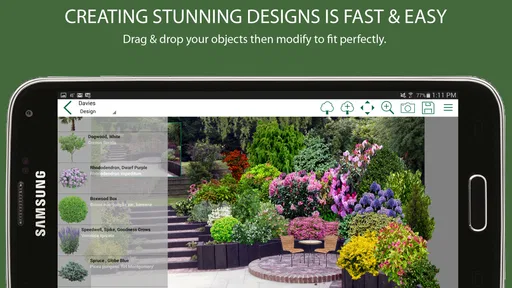
Yes, the app is designed to support landscape project visualization and client presentations. Depending on the version and device, users may be able to work with property images, add landscape elements, and prepare a more understandable preview of a proposed project. The quality of the final presentation will depend on the source photos, available design assets, screen size, and how much time you spend refining the layout.
Is PRO Landscape Contractor suitable for beginners?
The app can be useful for beginners, but it is primarily aimed at landscaping professionals and contractors, so some features may feel more business-oriented than consumer-friendly. New users should expect to spend time learning the interface, understanding the project workflow, and setting up their preferred templates or materials. A short practice project is recommended before using it during an important customer consultation.
Does PRO Landscape Contractor work offline?
Some project and editing functions may be available without a continuous internet connection, but offline behavior can vary according to the feature being used, the device, and the app version. Online access may be required for downloading resources, synchronizing information, updating content, or sharing certain presentations. Contractors working on-site should test the app in advance and avoid assuming that every function will work without connectivity.
Is PRO Landscape Contractor free to download and use?
The availability, price, and included features of PRO Landscape Contractor can depend on the platform, region, subscription terms, or licensing arrangement. Before downloading, check the current Google Play or App Store listing for purchase requirements, in-app payments, trial conditions, and supported devices. Professional users should also confirm whether the version they choose includes the design, estimating, presentation, and project-management tools they actually need.


